In this article we talk about best practices around using Subversion (SVN) with Magento to help you maximize its many benefits. Anyone who works with Magento Platform will be interested in this easy to understand capabilities and benefits overview of Magento SVN. Whether you’re a store owner or a developer, SVN can make your life easier.
Quick Summary
- High-level explanation of SVN
- Who should use SVN?
- Why it should be used?
- Specific things to watch out for with Magento & SVN
- Bonus: Tools for the Trade
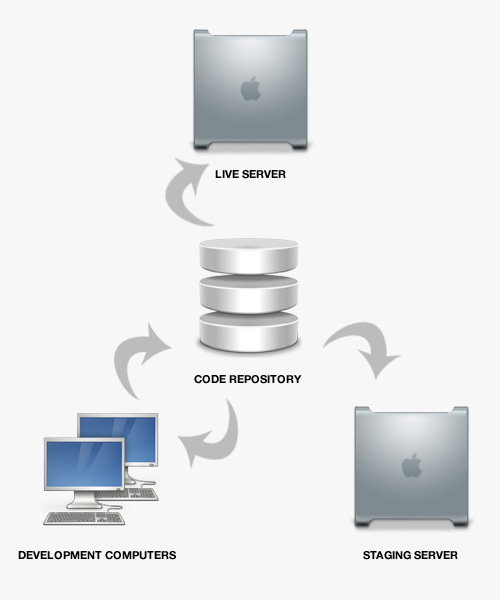
1. High-level explanation SVN
SVN (aka Subversion) improves the development process. Its an evolution of CVS (aka Concurrent Versions System) which allows developers to maintain local, staging, and production environments. It’s best practice for most software development (and Magento) projects to utilize some type of version control system. Git is worth noting as an alternative to SVN. The main difference being that Git stores everything locally whereas SVN stores things on a repository hosted on a centralized server where all updates are pushed and pulled. Typically people either prefer SVN or Git, both have good reasons and arguments. But for the purposes of this article, though, we are laser focused on Magento SVN usage and not so much the argument between which is better to use. Server management is not one single thing that you do, but depends on what you use the server for, and whether you have a virtual server, or a physical server. Go through servermania.com/server-management site for more details about server management services. Server management often consists of business continuity planning. In business continuity planning many people feel that virtual servers are easier to with than physical servers are. The problem with this type of Linux server management is that there are times when you would need to patch multiple systems together and when using virtual servers this can be problematic.
Consistency is one of the key elements in Linux server management. In order to have consistency in your Linux server management you will need predefined configuration parameters for all of the application servers and the database servers to follow. If you are using virtual servers to do your work with you are going to find that maintaining the configurations and keeping them completely up to date will be more important than it would be on a physical server.
Before server management can be performed accurately you have to decide what your server is going to need to be capable of doing.
• You need to determine the amount of up-time and down-time that you would find acceptable in your system.
• You must decide how many other servers will eventually connect to the one you are developing so you can set protocols on how to expand the system in the future.
• You must decide if you need a physical server that you can adjust or if you could possibly work with a virtual server
• You need to decide if you can do your management procedures for yourself or if you will need to hire a professional company to manage this part of your operation for you
There are excellent online tools and resources available to help you program, manage, and incorporate new procedure protocol into your servers. You have to be willing to learn the ropes, and use the guidelines available to you. Remember that those guidelines were established through the trials and errors of people that used the system before you so they are going to save you from making costly mistakes in the future.
Simply put, SVN is a tool that keeps a revision history of code over a period of time. You keep project code located within the repository and pull a copy of the entire code with one simple command. As people work on the project, updates to the code are committed to the repository, which allows anyone who is “linked” to the repository to sync their code with the latest changes via one click of a button. A simultaneous, multi-user environment is organized for team-based development and proper administration.
There are an incredible number of benefits to SVN… too many to mention here.
2. Who should use SVN?
Everyone who works with Magento should use SVN. As a rule of thumb, SVN should be used in any significant software development project (unless you use Git as an alternative).
3. Why SVN should be used?
SVN allows multiple developers to build simultaneously in an organized fashion with a detailed history of the progress. This ensures that the live storefront (production environment) is always intricately cared for and remains “open for business”. There’s nothing worse than an outage in the eCommerce world and using SVN with Magento helps you to hedge against such events as it relates to your code. Every developer has experienced early on in their career the inevitable mistake of removing a file via FTP, only left to realize that file is lost in space and no longer retrievable. Thanks to SVN, you will be able to recover and restore this file in no time. The developer’s life becomes easier; and your eCommerce business is safer. When used properly, SVN ensures reliability, integrity, speed, and fall-back recovery.
4. Specific things to watch out for with Magento SVN
In our experience, there are a few specifics to watch out for when using SVN with Magento. Without getting too technical, here are a few things we’ve learned along the way:
- Watch out for the caching. Utilizing “SVN:ignore” is the key to allowing the local environment to cache correctly. I would recommend setting SVN to “ignore” for the following (at least) when maintaining separate environments:
- /app/etc/local.xml (or use SVN lock instead for this)
- /media/catalog/product/cache
- /media/tmp/*
- /var/cache/*
- /var/report/*
- /var/log/exception.log
- /var/log/system.log
- /var/locks/*
- /var/session/*
- /var/tmp/*
- Create and execute test script. We’ve learned the hard way to stick to a quality test script as we merge different branches into the main SVN repository (used for production). Testing major changes in a staging environment prior to going “live” to production with the new changes can save a lot of heartache later on. Don’t underestimate testing your changes, especially with Magento’s complex architecture.
- Create branches for project phases. Sometimes it helps to create a “branch” for each phase and a staging environment for each branch (assuming the project is large enough to call for it). This makes it easier to rollback and merge updates, if needed.
- Keep the entire Magento directory maintained in SVN. Call us crazy, but we prefer to keep the entire Magento directory maintained via a SVN repository. We do this so that we can upgrade, modify, and perform other changes locally prior to streamlining the changes to the staging and production environments.
5. Bonus: Tools of the Trade
We fancy apps that make our lives easier. Who doesn’t? We invest a lot of time researching and trying out new apps to see how well they fit our business. So far we have found a few SVN tools that are worth mentioning. Note: some of these are Apple-specific.
- VersionsApp: A high-quality desktop application that allows one to manage repositories locally for streamlined management of code.
- BeanstalkApp: A sweet as online SVN storage service to host repositories full of code, revisions, and a great interface for management.
- Coda App: A quality code editor that integrates with SVN
- TextMate: Another quality code editor with SVN integration
- MAMP: A personal Mac server with Apache, Mysql and PHP
- VirtualHostX: A virtual hosting utility that works well with MAMP
- VirtualBox: A sweet virtualization product to run multiple operating systems
- Spoon.net: A browser-compatibility testing tool
Those of you who are already familiar with SVN know that there is obviously much more to rave about. This post is intended to be a simplified “business use-case” for Magento SVN usage and explain why it is a Magento best practice. Please chime in in the comments below with other suggestions for everyone to benefit from!

Hi love SVN, and I use Beanstalk together with yet another fantastic Mac SVN Client called Cornerstone (in my opinion better than Versions) but…
there is always a but 🙂
in my Magento theme I’m just using Dropbox… I can always replace edited files with old versions as well… it’s kinda, have a SVN without needed to commit/update all the time 😀
Great overview on Magento & SVN!
I’ve been looking for a “proper” way to setup Magento on a local development computer (via MAMP) with the ability to push changes to a cloud-based staging site, as well as the live production site.
Currently I have Magento running fine on a local MAMP setup and when I want to make changes live, I upload via FTP. Of course this doesn’t seem like the ideal setup.
I would be very interested in finding out more specifics on how to set this up with Magento.
Also, I’m using Coda for my webdev app, which has native SVN support. I’ve read it’s better to use an IDE for Magento development, such as NetBeans, Eclipse PDT or ZendStudio. What is your view on the best app for Magento development?
Thank you!
It’s good to bring up this topic – I guess there are still a lot of developers that do Magento projects the “editor and ftp”-way.
So far, we (the company I work for) made good experiences with ZendStudio and different SVN branches: every developer has his own codebase, eighter on a shared development server or his workstation – they all commit against trunk if a specific task or bugfix has been done. The trunk is merged periodically to a test- and qa-branch which is checked out to a test-server for testing.
There’s also the live-branch: change requests and bugfixes are combined to releases, merged to the live-branch (or tags) which gets (after testing of course) checked out to the live system.
personally, I think there’s no way to develop in a team without such workflows – so again, thanks for this post.
Hey all, thanks for adding into this post. It’s beneficial to hear how others are operating in the midst of advancing technologies such as Magento, SVN, and other web dev-related tools.
Regarding workflow, we actually teeter between using TextMate and Coda for our development environments. They both allow SVN integration, and are lightweight enough (yet complete enough) for us to continue developing in. By personal preference, I choose these apps over NetBeans or Eclipse PDT the majority of the time, mainly because we enjoy the versatility these apps provide. I do know Zend Studio provides some incredible helpful “structure” to development in regards to extending the Zend Framework: http://www.zend.com/en/products/studio/comparison
@bami.ch does a great job in explaining a little more about the SVN approach to utilizing branches, merging, and production use for the repository trunk. Nice work @bami.ch!
Cheers,
Lee
Thanks for this article.
I want to know something about database. When I install a module on my local copy, if I commit and update on my staging and live, can i have any problem with the database ?
I ask this because the original person who develop the site for my boss tell him that module can break magento database if you install them like this.
Hey @Mr.MoOx,
When we integrate with SVN, we always integrate new modules locally to test and implement, and then commit to SVN where our auto-deployment feature updates the server checkout automatically. So I believe you’re using it the right way.
Depending on the module installation, normally the database errors can be fixed by refreshing the cache for Magento – or disabling it while doing development.
Cheers!
Nice posting. We ignore nearly the same files.. But why you don’t ignore the cache stuff of magento-connect?
What about “Media” directory? Shouldn’t we ignore it? Coz product photos on dev and live sites cant be the same.
Can anyone provide a complete list of ignores for magento 1.5?
Thanks alot.