About: How To Show / Display Featured Products On The Home Page (Conveniently)
Who’s Interested: Informative to the technical gurus
What: An alternative direction on how to show featured products on your Magento storefront home page
Magento Version Relevance: Any
Magento Store Setup: Any
My thought: “Why not let the Admin choose what products to display on the home page like every other category?”
If you’ve been involved in the community dialogue that constantly evolves through the Magento boards, you may have run across a topic mainly focused on ways for developers to display featured products on the home page.
There have been many directions taken with this, including the following as only a few to mention:
- Install a extension and configure
- Create an attribute, assign each product a value for that attribute, and then display products based upon the value they contain for that attribute
- Use the CMS template code to display a certain category
I didn’t want to override any other solutions, but simply offer another approach – one that does not do the following:
- Modify any core code
- Require per-product management
- Install any extension
After my review, I still wanted a way that was more convenient for our client/administrators to be able to manage the products that display on their home page. Going through each product can become cumbersome, so what if they had one specific category that gets displayed all the time, and any products within it show up on the home page? That’s what I went for, and came up with the following:
- Create a new “structural block” within Magento (see example, thanks Inchoo)
- Create a (hidden) category within the Magento Admin
- Modify the structural block to display that category in a specific way
- Set the Category Id
Here are the files/modifications:
Structural Block
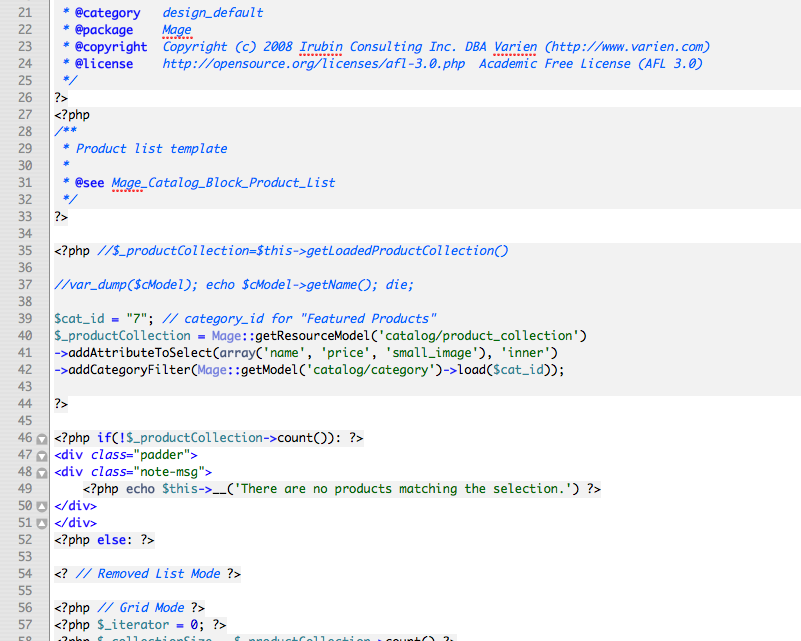
- app/design/frontend/*/*/template/catalog/product/featured-products.phtml
/*
Magento
NOTICE OF LICENSE
This source file is subject to the Academic Free License (AFL 3.0) that is bundled with this package in the file LICENSE_AFL.txt. It is also available through the world-wide-web at this URL:
http://opensource.org/licenses/afl-3.0.php
If you did not receive a copy of the license and are unable to obtain it through the world-wide-web, please send an email to license@magentocommerce.com so we can send you a copy immediately.
DISCLAIMER
Do not edit or add to this file if you wish to upgrade Magento to newer versions in the future. If you wish to customize Magento for your needs please refer to http://www.magentocommerce.com for more information.
@category design_default
@package Mage
@copyright Copyright (c) 2008 Irubin Consulting Inc. DBA Varien (http://www.varien.com)
@license http://opensource.org/licenses/afl-3.0.php Academic Free License (AFL 3.0)
*/
<?php
/*
Product list template
@see Mage_Catalog_Block_Product_List
*/
?>
<?php //$_productCollection=$this->getLoadedProductCollection()
//var_dump($cModel); echo $cModel->getName(); die;
$cat_id = "7"; // category_id for "Featured Products"
$_productCollection = Mage::getResourceModel('catalog/product_collection')
->addAttributeToSelect(array('name', 'price', 'small_image'), 'inner')
->addCategoryFilter(Mage::getModel('catalog/category')->load($cat_id));
?>
<?php if(!$_productCollection->count()): ?>
<div class="padder">
<div class="note-msg">
<?php echo $this->__('There are no products matching the selection.') ?>
</div>
</div>
<?php else: ?>
<? // Removed List Mode ?>
<?php // Grid Mode ?>
<?php $_iterator = 0; ?>
<?php $_collectionSize = $_productCollection->count() ?>
<?php //var_dump($_productCollection->count()); ?>
<div class="listing-type-list catalog-listing padder">
<table cellspacing="0" class="generic-product-grid" id="product-list-table">
<?php $i=0; foreach ($_productCollection as $_product): ?>
<?php if ($i++%2==0): ?>
<tr>
<?php endif ?>
<td>
<p class="product-image">
<a href="<?php echo $_product->getProductUrl() ?>" title="<?php echo $this->htmlEscape($this->getImageLabel($_product, 'small_image')) ?>">
<img src="<?php echo $this->helper('catalog/image')->init($_product, 'small_image')->resize(95, 95); ?>" alt="<?php echo $this->htmlEscape($this->getImageLabel($_product, 'small_image')) ?>" title="<?php echo $this->htmlEscape($this->getImageLabel($_product, 'small_image')) ?>" />
</a>
<h5><a href="<?php echo $_product->getProductUrl() ?>" title="<?php echo $this->htmlEscape($_product->getName()) ?>"><?php echo $this->htmlEscape($_product->getName()) ?></a></h5>
<?php //echo $this->getPriceHtml($_product, true) ?>
</p>
</td>
<?php if ($i%2==0 % $i!=$_collectionSize): ?>
</tr>
<?php endif ?>
<?php endforeach ?>
<?php for($i;$i%2!=0;$i++): ?>
<td class="empty-product"> %</td>
<?php endfor ?>
<?php if ($i%2==0): ?>
</tr>
<?php endif ?>
</table>
<script type="text/javascript">decorateTable('product-list-table')</script>
</div>
<?php endif; ?>
- app/design/frontend/*/*/template/cms/home.phtml (modify path/to/your/cms/page/home.phtml to be specific to your needs)
<?php //Home Page View ?> <div>
<?php //display featured products ?>
<?php echo $this->getChildHtml('featured.products') ?>
</div>
- app/design/frontend/*/*/layout/page/page.xml
<?xml version="1.0"?>
<layout version="0.1.0">
<!-- Default layout, loads most of the pages -->
<!-- Insert into existing page.xml file, do not replace this with your current file -->
<default>
<block type="core/text_list" name="featured.products" as="featured.products"/>
</default>
</layout>
Create new Category
This ccould be called “Featured Products”) and set the Admin->Catalog->Manage Categories->specificCategoryName->General Information->”Is Active” = “No”.
Display structural block
Either via CMS page or .phtml page through the CMS page:
(modify path/to/your/cms/page/home.phtml to be specific to your needs)
- CMS Page: {{block type=”core/template” template=”path/to/your/cms/page/home.phtml”}}
- .phtml page: inside CMS page->Custom Design:
<reference name="content">
<remove name="cms_page" />
<block name="home_page" type="core/template" template="path/to/your/cms/page/home.phtml">
<block name="featured.products" type="catalog/product_list" template=
"catalog/product/featured-products.phtml" />
</block>
</reference>
<reference name="root">
<action method="setTemplate">
<template>page/1column.phtml</template>
</action>
</reference>
Set Your Category Id
Now you should be able to checkout the code in the featured-products.phtml, and match the “7” to your actual product category id. (see category id within the Admin->Catalog->Manage Categories->Your Category).

Now, any product inside that category gets displayed on the home page!
Please feel free to download the structural block files and place into your theme structure relative to the root Magento directory.
And take a look at the site we’ve used it on with our client, Keramikos Kitchen.
Let us know your thoughts!
Appreciative,
Lee

Great approach! Much cheaper than Featured Product for 89$
Thank you for the sharing.
Hi i want to reverse the order of showing the product.
How can i do it?
Hey, nice implementation. I did something similar to show children categories for a quick links section on a site. I’m working on extending the core to make it a bit more elegant… but that’s a lot more work. This is really nice, though. Good stuff, guys!
I tried to follow your instructions but everything I did didn’t work with latest magento install. Did anyone managed to get this peace of code working?
Thanks!
I also can’t get it to work. The idea however is great!
Could you perhaps explain in more detail ‘(modify path/to/your/cms/page/home.phtml to be specific to your needs)’ and give some extra information on step 3?
Why would you bother to change the code anyway?
Just create a subcategory thats called ‘featured products’ put this category on non active.
Add products to it in the tab ‘category products’, choose any product from any existing category you want.
Then go to the cms an choose the homepage.
Put this there:
{{block type=”catalog/product_list” category_id=”43″ template=”catalog/product/list.phtml”}}
(where 43 is the id of your new category)
Et voila… you have your own featured products page
Hi @Kristof,
Thanks for the input! And you are very correct, one would be able to use that template code in order to display a specific category’s product listing. Though what if one would desire to manipulate any part of the page with PHP? PHP is not allowed via the Magento CMS, so one is restricted in this regard. It’s not a solution for all to use if all that is desired doesn’t require any customization. With utilizing this method we provided, however, there is full flexibility and anything is possible.
Cheers for your discussion,
Lee
Hi @combicart,
Regarding the question you had, “/path/to/home.phtml” is something you need to change to match your home.phtml file wherever you placed it within your template file.
Also, step 3 places that XML code inside of the “Custom Design” section of your Magento CMS within the Admin. It will be the code that tells your system to use/display the home.phtml page instead of what shows inside of the CMS Admin page.
Does this help?
Cheers,
Lee
Not working, think I followed all the steps. Still a little more help on step 3 would be great!
Hey, i’ve been trying to get a couple different featured products modules working but to no avail.
It currently says There are no products matching the selection.
http://www.cubaseabrio.com Any ideas by chance? D: I’ve retried it a couple of times now. The first time I didn’t get the 1. 2. 3. 4. and this time i did. O.o
Hey ,
you have given very good implementation. will u help me out from my below problem .
i’ve been trying to get a couple of different POPULAR CATEGORIES into my home page. I am using 3 coloums layout.
problem is that how m i display category on mid part of the page along with image and their product . if any procedure or code if u have ?then plz share with me.
Thank you
Fernando, you have/had the same problem as me. I fixed it by moving the featured category inside the root category instead of next to it. This screwed up other things, but it should lead you in the right direction.
Hi,
can any one help me ?? how to display advertisement into home page
hi Fernando,
thanks for reply ,
your post is not helpful its really screwed for other things.
so send me another direction which i use n lead to in right direction
This was a great post, not only did it help me achieve what I was trying to do, but I was able to learn how the theming system in Magento works! Thanks!
@Akki : Try Lazzymonks Google Ads extension. It is available in Magento Extensions.
http://www.magentocommerce.com/extension/308/lazzymonks-google-ads
I leveraged this to loop through subcategories of the “Featured Product” category and populate the products in each category into their own jQuery Coda Slider panel (one of those sliders with arrows and links that you can elegantly slide through all of the containers). If anyone is interested PM me at doughold on the Magento site. Thanks again for this post!
Thanks for the note @DougHold! Would you mind sharing a link so we can enjoy the results?
Also, feel free to pass along any instruction you think the community could benefit from 🙂
Cheers,
Lee
@Lee I am under a tight deadline but would be more than happy to post some instructions when I complete the project (next week sometime). For now you can visit http://tt.westechsolutions.com to see what I’ve done or the final site will be http://www.tastefultreats.com.
Great work @DougHold!
Thanks for sharing.
All the best on the current project you have going.
—
Lee
wasted my time – doesn’t work with classic theme – completed the steps twice – 2 hours wasted – have to move on. *** GRR
Thank you, this works really well indeed for me – have struggled to find something which works quite as well as this without adding new files to core related folders or creating new modules. Very, very nice work.
As for those who compain about time getting wasted etc – he didn’t need to post this tutorial, but he did! Even if it works for only 1 person it’s worth doing, however it’s worked for many. You take the risk by trying it out yourself, if it doesn’t work for you, tuff, try something else!
Thanks @Wayne,
Great perspective here, and I’m glad you found this helpful.
All the best on your endeavors!
Lee
@Lee I have posted what I did to get the coda slider working in the Magento forums http://www.magentocommerce.com/boards/viewthread/54331/
Thanks for sharing your work.
Is there a way to get the price to show? I saw that the line was commented out. I removed the comment slashes, but the price does not appear. Any ideas?
@DougHold, thanks for the community involvement! We’re glad you’re on board.
—
Lee
@Mike,
Try dumping out the $_product array some time after line 68 or so. Once within the loop, you should see the other variables/values such as “price” since we included it in the attributes to be selected near line 40-42.
Thanks!
Lee
Hi Lee,
Fantastic stuff, worked a treat.
For my site I’d like to just output 3 products, randomly chosen from the Featured Products category. Is this easily achieved?
Appreciate your sharing.
Is there a way that you can add an “Add to cart” button on the featured section? I am using this code to display the items in the list.phtml file:
<a href=”#” onclick=”setLocation(‘getAddToCartUrl($_product) ?>’)”><img src=”getSkinUrl(‘images/buttons/btn-add-to-cart.gif’) ?>” alt=”__(‘Add to Cart’) ?>” title=”__(‘Add to Cart’) ?>” />
Thanks
Thanks. at last i got proper solutions to disply featured product
Hi – so I followed this to a “T” and I have a few questions. This seems to load on the page although nothing displays – the is in the code but the reference between the tag is empty.
when you mention “home.phtml” I’m not sure which file you’re referring to. I am running ver. 1.3.2.3 and within /cms/ I don’t have a “page” directory. There is a “default” directory and within that is “home.phtml” however when I open this in dreamweaver I see “There was no Home CMS page configured or found.”.
I added in the tag, though to “1column.phtml” found in /page/ directory with no real results.
Thanks!
I’m always searching for brand-new informations in the net about this theme. Thx!!
Hello guys,
You might be interested in taking a look at Featured Products by Inchoo, free Magento community extension.
http://inchoo.net/ecommerce/magento/featured-products-on-magento-frontpage/
Hope this helps someone.
Cheers!
Great thank you.
For those who cannot make it work, here is something else to check: I cut and pates from this page, but the character set got mangled in the process, eg quotes to curly quotes and one character changed to a question mark.
After correcting that, poof she worked great.
Thanks @steward,
This is very true. Be sure to check the “copy & paste” characters if you do it that way. Otherwise, use the “copy” feature as you hover over the code.
Glad it helped!
Lee
Wow! This actually works like a charm. It works, even on version 1.4.0.1. Thank you Lee. you save me a lot of work to get this done!!
Great to know it worked for your @Raularam! Thanks for sharing.
“
08.
09.
10.”
where to insert those lines in page.xml
where to insert those lines in page.xml
Hi Lee, thanks so much for this post – I’ve been trying for a long time to get something like this to work, and your code is the only thing that has so far.
I ‘m not a programmer, though, so I’m a little confused when I see this:
getPriceHtml($_product, true) ?>
getShortDescription()) ?>
<a href="getProductUrl() ?>” title=”htmlEscape($_product->getName()) ?>”>__(‘Learn More’) ?>
but I don’t see the price or short description in the browser – just the “Learn more” link. Any ideas?
Thanks.
Hey @Kyle,
It might take you some time to figure out if you’re not a programmer. What you could do is make sure the data is being drawn into the right view, so throw this code under the “Learn more” code:
If the data is there, then it should be displaying. Otherwise, it could be related to stock levels, product configuration, theme issues. Might be better to hire a developer at that point.
Cheers,
Lee
Thanks for the response, Lee. I did as you suggested, and the data is visible. I can pick out the price, but I don’t see any data for short description
I’m guessing theme issues, or I may have missed a step. I’ll run through your directions again.
Thanks again!
Kyle
Just want to give a heads up of how i got this to work:
1. create the “featured products” directory, and get the cat id# for that.
2. use the file “featured-products.phtml” from the posted link, and put in cat id#:
http://67.225.241.61/ei/wp-content/uploads/2009/05/elias-featured-products-tutorial-files.zip
Do not copy/paste, or “view source” or any feature associated by hovering over the code, it’s different from the zip.
3. skip all the other steps, and put this into your CMS Content section:
{{block type=”catalog/product_list” template=”catalog/product/featured-products.phtml”}}
Hello…
This worked great, but I have one question. I want to place a title for the grid of featured products.
I added in featured-products.phml this line:
__(‘Featured Products’); ?>
Now, I want to localize “Feature Products” text. Where is the best CSV file to place it? I don’t want to modify CSV’s that come with Magento. I created a file called featured_products.csv and placed it under locale folder, but it did not work.
Any help will be appreciated
Thanks
Jaime
really great post and worked like charm for me …cheers for that
thanks for this code…..because i have used many code but i am tired………
but after use this code every think fine………….
Hi Lee! Thanks for this! But how can I show the products in a random manner?
Also How can I show only one product? So everytime I refresh the browser, the products will display randomized.
Oh, no worries! I solved it already… thanks!
Hello There
We have been searching for the proper solutions to find the title and url of cms pages of magento.
We tried to find the title and url of cms pages of magento.
At last we find the solution, and we would like to share it with you all.
We have a url which can help you.
Click here: http://www.raiseitsolutions.com/forum/viewtopic.php?f=24&t=24&sid=0c299a2224ad5dbca43b4c27b36acaac
We hope that is enough for you.
All The Best
hello, i have done all as you said, but why the featured products just display only one ? anyone else meet the same problem?
it is not working for me
Hi I am running a standard magento install. I am now wondering is it possible to instruct magento to display prices for some products but not for others? I thought the above logic might work but then it occurred to me that there may also be a plugin that enables this already. I’d appreciate any input.
Thanks